


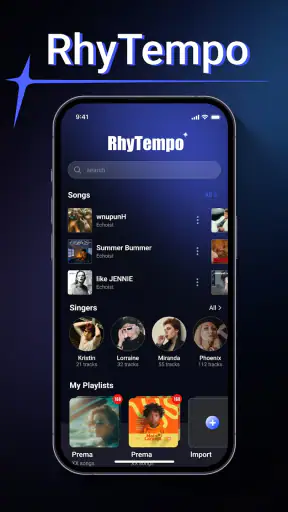
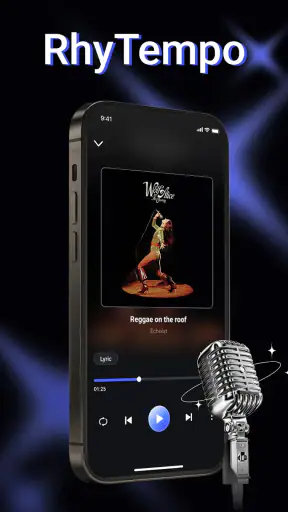
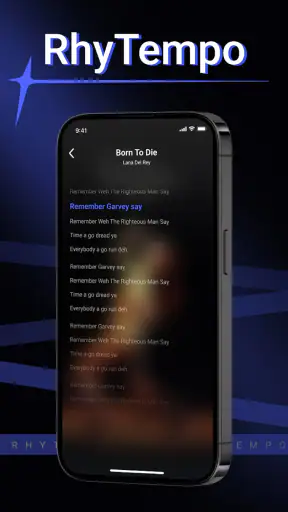
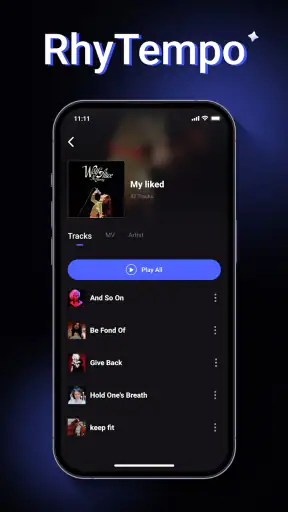
RhyTempo - Offline Music is the kind of music player I would recommend to someone who wants a straightforward way to listen to music already stored on an Android device, without turning the experience into another streaming subscription. Its central idea is simple: the player reacts to the way you listen rather than asking you to manage a complicated service. That makes the first impression approachable, although the app still needs a little patience while you learn how its listening-focused design fits your habits.
After spending time with it, I found the strongest reason to try it is control. Your local music collection remains the center of the experience, so you are not dependent on a signal, a catalog changing under you, or a monthly plan. The app is free, aimed at Everyone, and comes from WAKStudios. It sits in the Music & Audio category, with a 4.1 average from around 3.6 thousand ratings and more than 5 million installs, which gives it a useful level of real-world visibility without making it feel overloaded.
What to expect when you open RhyTempo
The first thing to understand is that this is an offline music player, not a replacement for a streaming library. If your expectation is to search for any artist and instantly play songs you do not already have, this is not the right starting point. Its value appears when your tracks are already on the phone and you want a focused listening tool that can work without relying on mobile data.
That distinction also explains why the app can feel quieter than a streaming service. There are no endless recommendations competing with your own collection, and there is no need to browse a huge online catalog before listening. I prefer that approach when I am commuting, travelling, or trying to save battery and data. It is also useful for albums and recordings that are not available on the services I normally use.
The store summary describes it as “The Music Player That Listens to You,” while the short description identifies it as RhyTempo. I read that less as a promise of magical personalization and more as a sign that the app wants the listening experience to respond to your behavior. The practical benefit is a player that feels centered on your routine rather than on promotional content.
RhyTempo is developed by WAKStudios and is available at no cost. It supports Android 7.0 and later, so it can suit people using older phones as well as those with newer devices. The current version is 1.1.4. Those details matter if you are installing it on an older handset or keeping a secondary phone for travel, because compatibility can be more important than having the newest interface.
Who will get the most from it
I think the best match is someone with a deliberately maintained local collection: downloaded albums, legally transferred files, recordings, or music copied from a computer. It also suits listeners who want to press play and leave the phone alone instead of being nudged toward new releases. The experience is especially comfortable for long stretches without reliable reception.
It is less suitable if your music life is built almost entirely around cloud playlists, collaborative queues, or discovering unfamiliar artists every day. A streaming app will normally be better for those tasks because its catalog and social features are the main attraction. RhyTempo makes more sense as a personal library player, not as an all-purpose music ecosystem.
Setting up your library without unnecessary frustration
For a first-time user, the most important setup step is making sure the music is actually available on the device. I would begin with a small, familiar group of tracks rather than moving an entire collection at once. A few albums are enough to confirm that RhyTempo sees your files and that the organization matches the way you think about your music.
Once the library appears, take a moment to check whether the songs are grouped in a useful way. Local players depend heavily on the information attached to each file. If an album appears split into several entries or tracks are filed under an unexpected artist, that is usually a library-organization issue rather than a sign that playback is broken. Correcting the file information before importing everything can save a lot of cleanup later.
My practical advice is to create a test routine: choose one album, play a track, move to another track, then leave the app and return to it. That small sequence answers the questions a new user usually has first: can the player find the music, does playback behave normally, and does the app remain comfortable when it is no longer the only thing on screen?
It is also worth deciding how you want to use the app before filling it with music. If you mainly listen to complete albums, keep the initial library tidy around album folders and artwork. If you jump between moods, artists, or individual songs, spend more time shaping your playlists or preferred browsing route. The best setup is not necessarily the one with the most files; it is the one that lets you reach your usual music with the fewest taps.
Your first meaningful success
The first successful action should be deliberately simple: choose a familiar album, start one song, and let it continue into the next part of your listening session. That sounds basic, but it confirms the entire value proposition of an offline player. You are no longer testing menus; you are using the app for the reason you installed it.
I would test this while the phone is in a situation where streaming would be inconvenient, such as a walk through an area with inconsistent reception or a flight with connectivity turned off. If the same collection remains ready to play, RhyTempo has already earned a place in your routine. This is a better test than comparing screens with another player, because it measures whether the app removes a real annoyance.
For a daily commute, I would prepare one compact listening choice before leaving home rather than depending on last-minute browsing. That habit reduces the chance of discovering that a favorite track was never stored locally. It also makes the app feel faster, because the decision has already been made and the player can get straight to playback.
A useful second test is to switch between a complete album and a mixed selection. Albums reveal whether the collection is organized properly, while mixed listening shows whether the app fits a less predictable routine. If one style feels natural and the other feels awkward, that tells you how to use RhyTempo rather than forcing it to behave like a different kind of app.
Small habits that make offline listening better
One non-obvious advantage of a local player is that you can treat your phone like a prepared music shelf. I recommend keeping a “ready for travel” group of albums or tracks separate from the rest of the collection. That way, you do not need to search through everything when you are leaving home, and you can notice quickly when a file has not been copied to the device.
Another useful habit is to test the collection with connectivity disabled before an important trip. Do it while you still have time to fix a missing file. This is more reliable than assuming that a song visible in a previous session is still available, especially if your music has been moved between folders or transferred from another device.
I also found that listening in album-sized sessions helps expose organization problems early. If the sequence jumps to an unrelated artist or a duplicate album, you can correct the collection while it is still small. That is a better workflow than importing everything and trying to remember which entries were wrong weeks later.
The real strength is not simply playing music without internet access; it is turning your own collection into a dependable, repeatable routine. That is a more modest goal than replacing every music service, but it is one RhyTempo can serve well when your files are prepared.
Common points of confusion for new users
The biggest source of confusion is expecting the app to supply music. RhyTempo is a player for the music you have available locally. If you open it and see a small library, that does not automatically mean the app is missing content. It may simply mean the phone does not yet contain the tracks you want to play.
Another common misunderstanding is treating the app like a streaming account that follows you everywhere. A local collection is tied to the device where the files are stored. Moving to another phone therefore requires thinking about the music files as well as the player. This can feel less convenient than signing into a streaming service, but it also gives you clearer ownership of the listening library.
Library sorting can create a similar problem. When a track appears under the wrong artist or album, the player is working with the information attached to that file. Before blaming the interface, check whether the original files are consistently labeled. A carefully organized collection makes a much larger difference here than repeatedly changing apps.
Some listeners may also wonder why an offline player does not immediately feel as feature-rich as a streaming alternative. The answer is that the two products solve different problems. Streaming apps invest heavily in discovery, online synchronization, and large catalogs. RhyTempo is more appealing when you value availability, simplicity, and a personal collection over constant novelty.
There is a trade-off in that simplicity. If you want recommendations based on listening history, shared playlists with friends, or a single account that keeps a cloud library synchronized across several devices, another option will probably be more convenient. I would not install RhyTempo expecting those services to appear around your local files.
It is also worth remembering that “free” does not mean every listening need disappears. You still need to obtain and organize the music you want to hear, and your storage space remains part of the equation. For a large collection, time spent preparing files can exceed the time spent choosing a player. That is not a flaw unique to RhyTempo, but it is an important part of the decision.
How it compares with the usual alternatives
Compared with a streaming service, RhyTempo gives up online discovery in exchange for independence from the network. I would choose streaming when I am exploring unfamiliar music or following frequently updated playlists. I would choose RhyTempo when I already know what I want and need it to be available without buffering, searching, or a data connection.
Compared with a more elaborate local player, its appeal is easier entry. Advanced alternatives may offer deeper customization, more elaborate library tools, or extensive audio controls. Those can be valuable for enthusiasts who enjoy tuning every part of playback. RhyTempo is better suited to someone who wants a clean path from stored files to listening and does not want the player itself to become a hobby.
The right comparison is therefore not “which app has the longest feature list?” It is “which inconvenience do I want to remove?” If your main frustration is losing access when the signal disappears, RhyTempo addresses that directly. If your main frustration is finding new music, managing a shared cloud collection, or adjusting highly technical sound settings, a different category of app may fit better.
Who should install it, and who should skip it
I would install RhyTempo for a family member who has music on an older Android phone and wants a simple player rather than another account to manage. I would also suggest it to a traveler who prepares albums in advance, a listener with recordings that are not part of mainstream streaming catalogs, or anyone who prefers a stable personal collection to an algorithm-driven home screen.
The Everyone content rating makes it approachable for a broad audience, but ease of use still depends on how organized the music files are. A first-time user may need help getting the collection onto the device and understanding why file labels affect the library. Once that foundation is in place, the listening side is much easier to evaluate.
I would skip it if my phone contained almost no music and I did not want to manage files. In that situation, installing an offline player alone would not solve the main problem. I would also skip it as my primary choice if I needed cloud access on several devices, constant recommendations, or a social listening experience.
The app’s audience size suggests it has moved beyond being an obscure experiment: it has passed 5 million installs and has received thousands of ratings. I still would not treat popularity as proof that it fits everyone. The important question is whether your music is already local and whether offline reliability matters more to you than online convenience.
My next-step recommendation
Start small. Put one familiar album or a short group of tracks on the phone, open RhyTempo, and try to complete a normal listening session without reaching for another player. If that works, add more music gradually and organize it around the way you actually listen. Do not begin by importing an untidy collection and then judge the app by the resulting clutter.
After that first success, test the app in the situation that motivated you to install it. Turn off connectivity before a commute, use it during a trip, or play a saved collection in a place where reception is unreliable. This reveals its practical value much faster than browsing through settings. If the player lets you reach your music calmly and consistently, it is doing the job I think it is designed to do.
My overall opinion is positive, with a clear boundary. RhyTempo - Offline Music is a sensible choice for Android users who want their own music to remain the main event. It is free, broadly compatible, and focused on a use case that streaming apps often make feel secondary. The compromise is equally clear: you must bring the music, keep the files organized, and accept that discovery and cloud convenience belong elsewhere.
For me, that trade-off is worthwhile when I am preparing a dependable offline collection. I would not present it as a universal replacement for streaming, but I would recommend it to a friend who says, “I just want to play the music already on my phone without complications.” In that situation, RhyTempo offers a reassuring route from setup to actual listening, provided you begin with a small, well-organized library.


